Developer Resources
Integrate with Plaid
Plaid and Vesta have partnered together to enable businesses to transact over ACH with confidence by offering a guarantee for every approved transaction. Plaid’s seamless account-linking experience married with Vesta’s industry-leading fraud detection technology help to both increase conversion and minimize losses. Available as a full-service processing solution or layered on top of your existing payment facilitator, Plaid and Vesta’s Guaranteed ACH solution is designed for maximum convenience and flexibility
With the Plaid + Vesta integration, your users can verify their accounts in seconds by inputting their banking credentials in Plaid’s front-end module. Plaid’s mobile-friendly module handles input validation, error handling, and multi-factor authentication–providing a seamless onboarding experience to convert more users for your business. Vesta then runs a fraud risk analysis on the connected account, assesses each transaction and approves it for a guarantee. Once approved, Vesta can either initiate the payment as a full-service solution, or return feedback so you can instruct your existing processor to run the transaction, as a truly processor-agnostic solution.
Getting Started
You'll first want to familiarize yourself with Plaid Link, a drop-in integration for the Plaid API that handles input validation, error handling, and multi-factor authentication. You will need to be a Vesta and Plaid customer in order to implement the Vesta + Plaid solution.
Your customers will use Link to authenticate with their financial institution and select the bank account they wish to use. From there, you'll receive a Plaid access_token and a Vesta processor_token, which allows you to quickly and securely verify a bank funding source via Vesta's API without having to store any sensitive banking information. Utilizing Plaid + Vesta enables a seamless workflow for sending and receiving payments.
Instructions
Step 1: Setting up your Plaid and Vesta accounts
You'll need accounts at both Plaid and Vesta in order to use the Plaid + Vesta integration.
Vesta: Work with the Vesta team to sign up for a Vesta account if you do not already have one.
Plaid: Ask your Plaid Account Executive or Growth Manager to enable your Plaid account for the Vesta Integration. If you do not have a Plaid account, you can create one here.
Step 2: Get your Plaid API keys
Retrieve your API keys from the Plaid dashboard. You have three different API keys that will be available after registering:
- Public key: Non-sensitive public identifier that is used to initialize Plaid Link.
- Client ID: Private identifier that is required for accessing any financial data.
- Secrets: Private identifier that is required for accessing any financial data and is unique to each API environment.
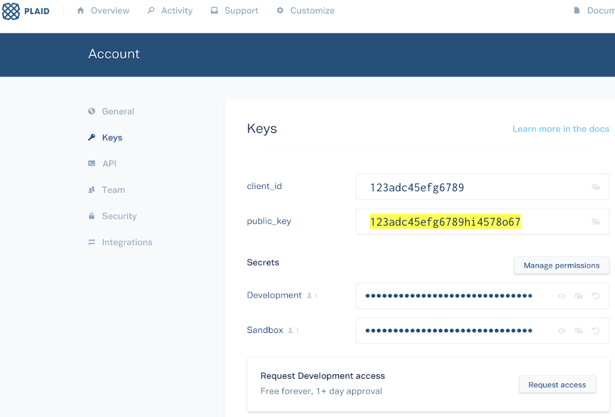
You will use your public_key in step 3 to initialize Link. The public_key is a less privileged version of your client_id and secret. It simply associates accounts you create using Plaid Link with your client_id and secret. You will use your client_id and secret in step 4 to make calls to the Plaid APIs. All Plaid API requests (exchanging tokens and creating processor_tokens) must be made using your client_id and secret.
Step 3: Integrate with Plaid Link
Start by embedding Plaid Link into your experience. All it takes is a few lines of client-side JavaScript code. See the client-side handler here. For the Vesta integration, please be sure to set product: ['auth'].
Step 4: Write your server-side handler
Plaid’s Link module handles the entire onboarding flow securely and quickly, but does not actually retrieve account data for a user. Instead, the Link module returns a public_token and an account_id (a property on the metadata object) via the onSuccess callback.
This public_token must be exchanged for a Plaid access_token using the /item/public_token/exchange API endpoint. Once you have the access_token for the Item, you'll create a Vesta processor_token. You'll send this token to Vesta and they will use it to securely retrieve account data from Plaid.
Serve-side handler components:
- Token Exchange Flow: See Plaid’s standard documentation here.
- Processor Token Creation: Create a Vesta processor_token for a specific account id.
Endpoint: processor/token/create
URL: https://sandbox.plaid.com/processor/token/create
Request Parameters:
“client_id”: String,
“secret”: String,
“access_token”: String,
“account_id”: String,
“processor”: “vesta”
- Send processor token to Vesta: Vesta can receive the Plaid processor token in the following two API’s based on your solution.
Title: CheckPaymentFraudRequest
Description: Allows Vesta to do the guarantee when they will not be the one processing the payment.
Endpoint: GatewayV4Proxy/Service/CheckPaymentFraudRequest
Request Parameters:
"AccountName": "string",
"Password": "string",
"TransactionID": "string",
"AccountNumber": "string", //Plaid Token
"AccountNumberIndicator": "6" , //Indicates Plaid
"Amount": "currency",
"AcquirerAuthResultCode": "string",
"PaymentSource": "string",
"PaymentType": "1",
"CheckType": "P",
"RiskInformation": "string",
"MerchantRoutingID": "string",
"WebSessionID": "string",
"AccountHolderAddressLine1": "string",
"AccountHolderCity": "string",
"AccountHolderRegion": "string",
"AccountHolderPostalCode": "string",
"AccountHolderCountryCode": "string",
"AccountHolderFirstName": "string",
"AccountHolderLastName": "string",
"AccountHolderPhoneNumber": "string"
Response Parameters:
"IsPaymentGuaranteeable": "Boolean",
"PaymentGuaranteeStatus": "Integer",
"PaymentID": "string",
"PaymentStatus": "Integer",
"RiskProbabilityIndex": "Integer",
"ResponseCode": "Integer",
"ResponseText": "string",
Title: CheckPaymentRequest
Description: Vesta will facilitate the payment as well as the guarantee.
Endpoint: Gateway: V4Proxy/Service/CheckPaymentRequest
Request Parameters:
"TransactionID": "string",
"AccountName": "string",
"Password": "string",
"AccountNumber": "string", //Plaid Token
"AccountNumberIndicator": "6", //Indicates Plaid
"Amount": "currency",
"PaymentSource": "string",
"PaymentType": "1",
"CheckType": "P",
"WebSessionID": "string",
"RiskInformation": "string",
"MerchantRoutingID": "string",
"AutoDisposition": "1",
"AccountHolderAddressLine1": "string",
"AccountHolderCity": "string",
"AccountHolderRegion": "string",
"AccountHolderPostalCode": "string",
"AccountHolderCountryCode": "string",
"AccountHolderFirstName": "string",
"AccountHolderLastName": "string",
"AccountHolderPhoneNumber": "string"
Response Parameters:
"PaymentAcquirerName": "string",
"CheckValidationDecision": "Integer",
"PaymentID": "string",
"PaymentStatus": "Integer",
"ResponseCode": "Integer",
"ResponseText": "string"
Step 5: Vesta side integration steps
Vesta currently offers 3 programs integrated with the Plaid link technology, Vesta Payment Guarantee, Vesta Guarantee Plus, and Vesta Payment Guarantee (Enterprise Acquiring). All three programs are inclusive of the Vesta Payment Guarantee, where the second and third solution allow Vesta to initiate the payment as a gateway or a full-service solution (Merchant of Record) respectively.
Vesta’s Device Fingerprint and Behavioral Analytics must be implemented client-side for all 3 programs.
Implementing Device Fingerprint and Behavioral Analytics
Vesta’s device fingerprinting integration allows our risk team to conduct real-time monitoring by detecting transaction and device anomalies and by enabling detection of the transaction’s originating-device IP address. Device fingerprinting is required for all Web transactions and the implementation is only on the checkout/payment page.
Our Data Collector product allows our risk team to capture and analyze user behavior on your website. This data is leveraged in real-time transaction risk decisions to both decrease fraud and increase acceptance rates. Implementation of this service follows the entire customer journey, from the first landing page, through registration, shopping and checkout/payment pages.
Implementation
This section describes the information that is required on the Web form.
The GetSessionTags API is used to generate a session identifier, referred to as a WebSessionID, that is used for the Data Collector and ThreatMetrix service implementations.
GetSessionTags should only be called once in the first page of your flow that a user lands on. The WebSessionID should be stored and passed to all subsequent pages in your flow that will use Data Collector and/or Device Fingerprinting, ensuring that the same WebSessionID is used throughout the user’s session.
When the GetSessionTags API is called, a {WebSessionID} and {OrgID} are returned.
- GetSessionTags
- Title: GetSessionTags
- Description: Returns a unique WebSessionID and OrgID to embed in Device Fingerprinting and Behavioral Analytics javascript.
- Endpoint: Gateway: V4Proxy/Service/GetSessionTags
- Request Parameters:
"AccountName": "string",
"Password": "string",
"TransactionID": "string"
- Response Parameters:
"OrgID": "string",
"ResponseCode": "string",
"ResponseText": "string",
"WebSessionID": "string"
Device Fingerprinting
Both {WebSessionID} and {OrgID} parameters must be embedded in the device fingerprinting JavaScript on the Web form.
Note: The Data Collector script-loading is asynchronous and should be placed at the top of the page. The Fingerprinting script could take up to five seconds to process the tag links. We recommend placing the tag links code for Fingerprinting at the bottom of the page and disabling the Submit button until the page loads completely.
When the form is submitted to the Web server, the {WebSessionID} parameter is required for the ChargePaymentFraudRequest API call.
Sample Code - Device Fingerprinting
For Device Fingerprinting, copy and paste the following code into your Web form on the Payment page only, and then replace the information within the brackets with the OrgID and WebSessionID response parameters returned by the GetSessionTags API call.
<%@ taglib uri="http://java.sun.com/jstl/core" prefix="c"%>
<!-- Begin fingerprinting tags below -->
<p style="background:url(https://fp.ecustomerpayments.com/DF/fp/clear.png?org_id="{OrgID}"&session_id="{WebSessionID}"&m=1)"></p>
<img src="https://fp.ecustomerpayments.com/DF/fp/clear.png?org_id="{OrgID}"&session_id={WebSessionID}"&m=2" alt=""/>
<script src="https://fp.ecustomerpayments.com/DF/fp/check.js?org_id="{OrgID}"&session_id="{WebSessionID}" type="text/javascript"></script>
<!-- End fingerprinting tags -->
Data Collector
The assigned Account Name and {WebSessionID} must be embedded in the Data Collector content server and subsequent JavaScript on the Web form.
Sample Code - Data Collector (Sandbox)
The first page and all subsequent pages should include the below code in the HEAD section to initiate Data Collector. AccountName and WebSessionID should be replaced with the Account Name given to you during onboarding and the WebSessionID created when you called the GetSessionTags API earlier:
<!-- Begin Data Collector tags below -->
<script src="https://riskcsproxy.ecustomersupport.com/DCCSProxy/Service/vdccs.js?AccountName=XXXX&WebSessionID=YYYY" async type=“text/javascript”></script>
Sample Code - Data Collector (Production)
The first page and all subsequent pages should include the below code in the HEAD section to initiate Data Collector. AccountName and WebSessionID should be replaced with the Account Name given to you during onboarding and the WebSessionID created when you called the GetSessionTags API earlier:
<!-- Begin Data Collector tags below -->
<script src="https://collectorsvc.ecustomersupport.com/DCCSProxy/Service/vdccs.js?AccountName=XXXX&WebSessionID=YYYY" async type=“text/javascript”></script>
After Device Fingerprinting and Behavioral Analytics are completed you are ready to implement Vesta’s Restful API’s based on the program you elected. Follow Path 1 or Path 2 respectively.
Path 1: Vesta Payment Guarantee – Vesta completes the decision and customer processes the payment with their own payment facilitator . For this process, the customers will be sending the Plaid processor token to Vesta CheckPaymentFraudRequest API. This API will return to the customer the risk information about the transaction and the Payment guarantee information.
- Implement the Payment & Risk Decision Request and Response API’s.
- CheckPaymentRequest (See above)
- Implement the RiskInformationXML to provide customer and order details.
- Disposition
Title: Disposition
Description: Notify Vesta of the final Disposition of the Transaction.
Endpoint: Gateway: V4Proxy/Service/Disposition
Request Parameters:
"AccountName": "string",
"Amount": "currency",
"DispositionType": "string",
"Password": "string",
"PaymentID": "string",
"TransactionID": "string"
Response Parameters:
"PaymentGuaranteeStatus": "Integer",
"PaymentID": String,
"PaymentStatus": Integer,
"ResponseCode": Integer,
"ResponseText": String
- CheckPaymentRequest (See above)
Path 2: Vesta Payment Guarantee Plus and Vesta Payment Guarantee (Enterprise Acquiring) – These programs pair fraud decisioning with payment processing for a comprehensive solution, either as a gateway or as the merchant of record for a full-service solution. Vesta provides a fraud decision and facilitates the payment transaction as well.
- Implement the Payment & Risk Decision Request and Response API’s.
- CheckPaymentRequest (See above)
- Implement the RiskInformationXML to provide customer and order details.
- CheckPaymentRequest (See above)
Vesta supports both one step and two step processing. The merchant will indicate this flow based on the AutoDisposition parameter of the CheckPaymentRequest API.
One step processing: Sending the Plaid Processor token to Vesta to CheckPaymentRequest API with the AutoDisposition=1. These APIs will process all steps until a disposition is made. No extra APIs need to be implemented.
Two step processing: Sending the Plaid Processor token to Vesta CheckPaymentRequest API with the AutoDisposition=0, then, the customer will be able to complete the payment calling the following API
- AuthResult
Title: AuthResult
Description: Notify Vesta of the acquirer Auth result for this transaction.
Endpoint: Gateway: V4Proxy/Service/AuthResult
Request Parameters:
"AccountName": "string",
"AcquirerAVSResultCode": "string",
"AcquirerAuthResultCode": "string",
"AcquirerCVVResultCode": "string",
"Amount": "currency",
"Password": "string",
"PaymentID": "string",
"TransactionID": "string"
Response Parameters:
"IsPaymentGuaranteeable": "Boolean",
"PaymentID": String,
"PaymentStatus": Integer,
"ResponseCode": Integer,
"ResponseText": String,
"RiskProbabilityIndex": Integer,
"RiskScore": Integer
- Disposition
Title: Disposition
Description: Notify Vesta of the final Disposition of the Transaction.
Endpoint: Gateway: V4Proxy/Service/Disposition
Request Parameters:
"AccountName": "string",
"Amount": "currency",
"DispositionType": "string",
"Password": "string",
"PaymentID": "string",
"TransactionID": "string"
Response Parameters:
"PaymentGuaranteeStatus": "Integer",
"PaymentID": String,
"PaymentStatus": Integer,
"ResponseCode": Integer,
"ResponseText": String
Step 6: Testing
You can create valid Vesta processor_tokens in the following Plaid API environments:
Sandbox (https://sandbox.plaid.com/): test simulated users
Development (https://development.plaid.com/): test live users
Production (https://production.plaid.com/): production environment for when you're ready to go live and have valid Vesta Production credentials
Once you have a processor_token from Plaid you can exercise Vesta APIs using your sandbox credentials and passing the token with the appropriate parameters to the CheckPaymentRequest or CheckPaymentFraudRequest APIs.
Sandbox (https://vsafesandbox.ecustomersupport.com/GatewayV4Proxy/Service/)